The portal is live, but emails keep coming
The portal goes live on a Monday, the team does the quick internal test, and by Wednesday the “quick question” emails are back. Not the angry kind—just enough to pull staff out of returns: “Did you get my W-2?”, “I uploaded it but it’s not showing,” “Can I just forward this PDF?” The frustrating part is that the portal technically works, yet the workload doesn’t drop in the way the pricing spreadsheet assumed.
What shows up first isn’t a portal failure so much as a routing problem. Clients still treat email as the receipt, the portal as the storage bin, and your staff as the confirmer. Without an immediate, client-visible acknowledgment and a clear “missing items” view, the same uncertainty that drove email before just shifts into more touchpoints after the upload.
What you expected automation to fix first
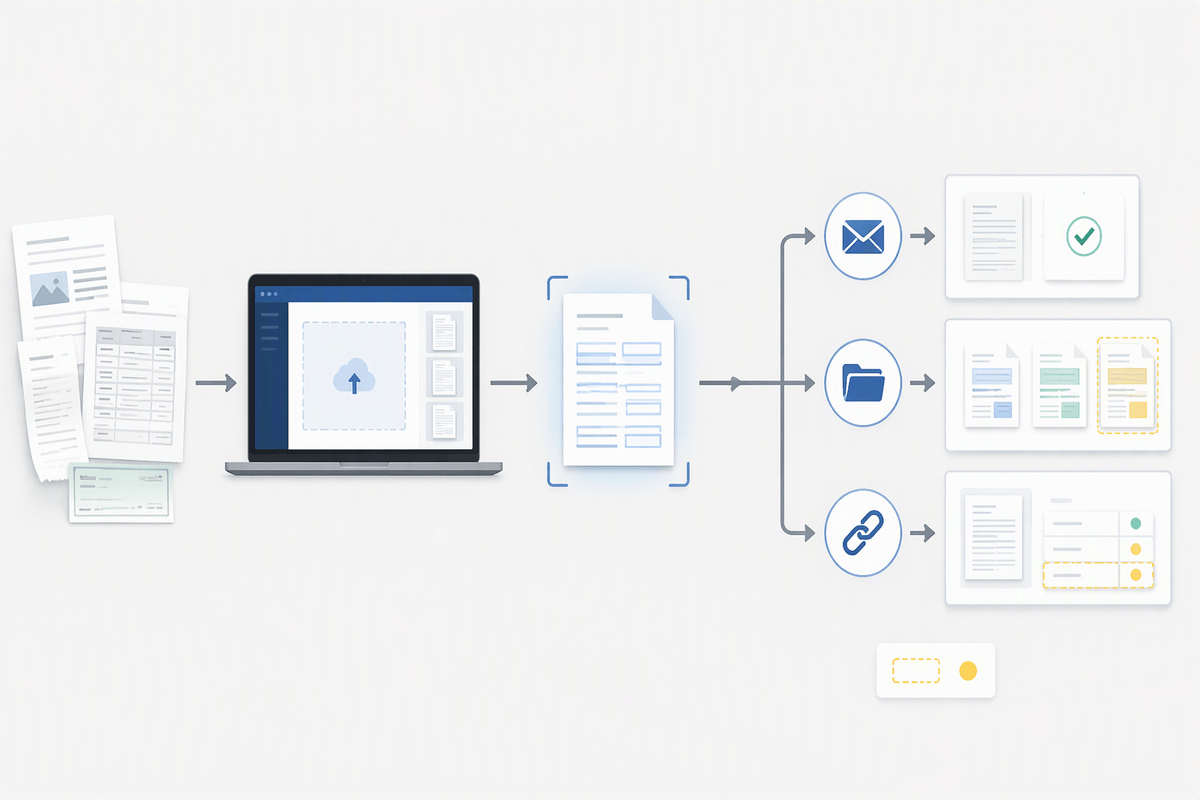
The first hope is usually simple: fewer pings about whether something arrived. A portal plus OCR sounds like it should eliminate the “did you get it” loop, auto-file the obvious documents, and surface what’s still missing without anyone building a tracker. In busy season math, that’s the cleanest margin win—less admin time, fewer interruptions, fewer status updates that don’t move the return forward.
But that expectation tends to bundle three separate jobs into one “automation” label: confirming receipt, classifying the document correctly, and tying it to a specific tax item on a specific year. When even one of those steps is fuzzy, the email comes back—sometimes faster—because clients assume the tool is instantaneous. If the portal can’t show a client-facing “received and accepted” state within minutes, staff still becomes the human confirmation layer, just with a nicer interface and a new subscription cost.
Where the follow-ups actually come from
By the end of the first week, the follow-ups usually aren’t about “how do I upload” anymore. They’re about ambiguous status. A client uploads a file, sees it sitting in a generic list, and can’t tell whether it’s been reviewed, matched to the right taxpayer, or even opened. Internally, staff can see the document exists, but not whether it’s usable—password-protected PDFs, cropped photos, brokerage statements missing the second page, or a W-2 that’s really a prior-year copy. That gap creates a predictable pattern: the client asks for reassurance, and the team asks for clarification, even though the portal did its basic job.
The second source is misalignment between “document received” and “tax item satisfied.” A portal can show ten uploads and still be missing a single number needed to finish the return. When the workflow doesn’t translate uploads into a simple, client-visible checklist (2026 W-2 for Sam, 1099-INT for Pat, K-1 for the partnership), follow-ups cluster around edge cases: duplicates that overwrite the wrong year, combined PDFs that OCR can’t split cleanly, and renamed files that look complete until review. Those are the emails that survive automation because they’re really about decisioning, not intake.
Features that prevent missing items without nagging

Once the first “did you get it” wave hits, the practical test becomes whether the portal can replace your staff’s gentle chasing with something that feels like progress to the client. The features that help most aren’t louder reminders; they’re the ones that turn uncertainty into a visible state change. A client-facing receipt that’s more than “uploaded” matters here—an immediate “received” confirmation plus a second status like “accepted for 2026” or “needs attention” cuts down the reflex to email, because the client can see the file moved from limbo into a decision. The constraint is timing: if that second status only appears after a manual review two days later, you’re back to human reassurance.
The next lever is a checklist that’s specific enough to be trusted. Not “Income documents,” but “Sam: 2026 W-2 (1 expected), Pat: 2026 1099-INT (bank name), Partnership: 2026 K-1.” When the portal can prefill that list from last year’s organizer, bookkeeping feed, or prior return data, the missing-items view becomes credible without staff rebuilding it. A soft gate helps too: letting clients upload anything, but gently flagging “you marked K-1 expected” if they try to hit “Done” without it. That’s not nagging; it’s a stop sign at the exact moment they want completion—and it prevents the late-February scramble that costs you the most.
Features that stop wrong or duplicate documents
The next snag tends to look “organized” at first: plenty of files, all neatly timestamped, yet review time stretches because half of them are wrong for the year or repeated in slightly different forms. Clients re-upload the same brokerage packet as “final,” “final2,” and “the right one,” or they send a screenshot of a W-2 box instead of the full form. If the portal treats every upload as equally valid, staff ends up doing quiet triage—opening, comparing, renaming—because rejecting a file feels like inviting more email. The cost isn’t just minutes; it’s the risk of keying off the wrong version when deadlines compress.
The features that actually blunt this are the ones that force a clear match, without forcing a phone call. Document-type capture at upload (even a simple “W-2 / 1099 / K-1 / Other” prompt) improves OCR accuracy and reduces “mystery PDFs.” Stronger still is year validation: if the OCR sees 2025 on a W-2 while the checklist expects 2026, the portal should flag it immediately and ask whether it’s prior-year. Duplicate detection matters in the same way—hashing or content similarity that groups near-identical files, plus a visible “keep this one” choice, prevents staff from guessing which upload to trust.
Finally, look for guardrails around combined PDFs and amended statements. If the tool can split common packets, preserve page order, and label “page 1 of 12” clearly, it reduces the partial-upload problem that creates rework later. And if it can track “superseded” documents—keeping the audit trail but marking one as inactive—you avoid the February scenario where an intern imports both versions into the workpapers. The practical constraint is configuration: these controls only work if your team commits to a small set of document categories and a consistent “accepted vs replaced” habit during intake.
When clients ignore the workflow anyway
Even with those guardrails, a portion of clients will keep testing the edges. They’ll forward a PDF “because it was faster,” text a photo of page one, or upload everything under “Other” on a Sunday night and expect the return to move Monday morning. The friction isn’t training; it’s timing. When a client is already late, the portal feels like extra steps, so they reach for the channel that historically produced a human response. If your staff then rescues the workflow by downloading the email attachment and quietly filing it, you teach the client that compliance is optional.
The pattern that holds up better is making off-workflow intake more expensive than on-workflow intake, but only in predictable ways. Auto-reply rules that say “emailed docs aren’t tracked; please upload for confirmation,” plus a hard policy that emailed attachments get a “received” acknowledgment only after they’re in the portal, keeps the portal as the source of truth. Internally, staff needs a quick “convert to portal item” button or drag-in mailbox intake; otherwise the policy collapses under capacity. The constraint is client-facing: you’ll still accept exceptions, but you label them as exceptions so they don’t become the default again.
Revised success criteria and a rollout you can defend
By this point the win can’t be “clients stop emailing” because that’s not a controllable outcome in February. A defensible success metric is narrower: fewer touches per return to reach a usable “ready to prep” state. Track two numbers for four weeks: how many follow-ups are sent per client, and how many uploads get a “needs attention” flag within the first hour (wrong year, unreadable, duplicate). If those move in the right direction, the tool is doing real work, even if inbox volume stays noisy.
Rollout works better as a tiered policy than a firmwide switch. Start with new clients and your highest-volume 1040 segment, then add business returns once staff has a stable intake habit. Publish one rule clients can repeat—“upload to be confirmed”—and one exception that has a price (email accepted, but no status until it’s in the portal). The goal isn’t perfection; it’s being able to point to a repeatable process when a deadline is tight and the margin is thinner than anyone wants to admit.